Documentation
Complete reference for revdiff usage, configuration, themes, keybindings, the pi package, the Claude Code plugin, the Codex plugin, and the OpenCode integration.
Requirements
git, hg (Mercurial), or jj (Jujutsu) is used to generate diffs. VCS is optional when using --only for standalone file review or --stdin for scratch-buffer review. In colocated git+jj repositories, revdiff uses the jj working-copy model.
Jujutsu must be 0.27 or newer. Versions 0.23 through 0.26 have no jj file annotate -T, so the blame gutter does not work. Versions before 0.23 also reject the commit-log template behind the commit-info popup.
Installation
Homebrew (macOS/Linux)
brew install umputun/apps/revdiffArch Linux (AUR)
paru -S revdiffDebian/Ubuntu
sudo dpkg -i revdiff_*.debDownload the latest .deb for your architecture from GitHub Releases.
RPM-based (Fedora, RHEL)
sudo rpm -i revdiff_*.rpmDownload the latest .rpm for your architecture from GitHub Releases.
Go
go install github.com/umputun/revdiff/app/revdiff@latestInstalls the revdiff binary into GOBIN (defaults to $(go env GOPATH)/bin). Add that directory to your PATH.
Binary releases
Download from GitHub Releases — deb, rpm, archives for linux/darwin amd64/arm64.
Pi package
revdiff also ships as a pi package. The /revdiff command routes requests through the revdiff skill, which resolves refs, files, and natural-language targets before launching the existing revdiff binary through the revdiff_review tool. If no annotations were captured, the agent stops the review loop unless you explicitly ask for another review.
pi install https://github.com/umputun/revdiffCommand inside pi
/revdiff [args]Useful args
/revdiff                         -- detect uncommitted, staged, or branch changes, then open revdiff
/revdiff HEAD~1 HEAD             -- review last commit
/revdiff main                    -- review against main
/revdiff --staged                -- review staged changes
/revdiff --untracked             -- include untracked files in working-tree review
/revdiff --all-files             -- browse all tracked files
/revdiff --all-files --exclude vendor
/revdiff --only README.md        -- review a single file in context-only mode
/revdiff HEAD~3 --description="why this refactor matters"
/revdiff HEAD~3 --description-file=/tmp/revdiff-desc.md
/revdiff main --annotations=/tmp/revdiff-review.md
Natural-language targets are supported because /revdiff routes through the skill:
/revdiff prev commit
/revdiff last tag
/revdiff 2 weeks ago
Agent workflow
/revdiffis a Pi command alias for/skill:revdiff; the skill resolves the request and callsrevdiff_review.revdiff_reviewsuspends pi, hands the terminal to revdiff, then returns captured annotations to the agent.- The agent classifies annotations into explanation requests and code-change directives.
- Explanation requests are answered first in normal chat, without opening another revdiff session for the explanation.
- Any no-annotation
revdiff_reviewresult stops the loop. The agent must not relaunch revdiff unless you explicitly ask for another review. - For explanation-only annotations, the agent asks whether to continue the original review or finish.
- Before editing repository files, the agent lists planned code/file changes, applies the changes, then reruns
revdiff_reviewwith the same args until no annotations are captured.
Notes
- Requires the
revdiffbinary onPATH - Set
REVDIFF_BIN=/absolute/path/to/revdiffif pi can’t find the binary - Direct terminal handoff is the only Pi launch mode
- Exit code
10means annotations were captured, not failure - Use
--untrackedwhen agent-created files should be reviewed before they are staged - Use
--descriptionor--description-fileafter analysis/refactor work so the info popup carries review context - Use
--annotations=<tempfile>to preload in-session review notes - Successful
revdiff_reviewresults include captured annotation text; history is only for explicit latest-history requests or missing-output fallback - For "use my latest revdiff annotations", the agent should read the newest file under
$REVDIFF_HISTORY_DIRor~/.config/revdiff/history/instead of relaunching revdiff - In the repo, the pi-specific resources live under
plugins/pi/to keep harness integrations clearly separated
Usage
revdiff [OPTIONS] [base] [against]Positional arguments support several forms:
revdiff— uncommitted changesrevdiff HEAD~3— diff a single ref against the working treerevdiff HEAD~1 HEAD— review exactly the last commitrevdiff main feature— diff between two refsrevdiff main..feature— same as above, git dot-dot syntaxrevdiff main...feature— changes since feature diverged from main
In git modes (--staged, single-ref, two-ref) renamed files are detected automatically: the diff-pane header shows the rename origin as old → new and the diff renders only the real line changes instead of a full delete-and-add. With --untracked, a plain working-tree mv old new (where the new file is still untracked) is paired as a rename too. Rename detection is git-only; hg and jj show renames as separate delete/add entries.
Examples
# review uncommitted changes
revdiff

# review changes against a branch
revdiff main

# review staged changes
revdiff --staged

# review last commit
revdiff HEAD~1 HEAD

# diff between two refs
revdiff main feature

# review only specific files
revdiff --only=model.go --only=README.md

# browse all git-tracked files
revdiff --all-files

# browse all files, excluding vendor and mocks
revdiff --all-files --exclude vendor --exclude mocks

# include only src/ files
revdiff --include src

# include src/ but exclude src/vendor/
revdiff --include src --exclude src/vendor

# exclude paths in normal diff mode
revdiff main --exclude vendor

# same as above, git dot-dot syntax
revdiff main..feature

# review a standalone file (no git needed)
revdiff --only=/tmp/plan.md

# review a file with no git changes (context-only)
revdiff --only=docs/notes.txt

# diff two arbitrary files (no VCS repo needed)
revdiff --compare-old=/tmp/plan-old.md --compare-new=docs/plans/plan.md

# review piped text as a scratch buffer
printf '# Plan\n\nBody\n' | revdiff --stdin --stdin-name plan.md

# capture annotations from generated output
some-command | revdiff --stdin --output /tmp/annotations.txt

# round-trip: capture, edit externally, reload
revdiff -o review.md HEAD~1
$EDITOR review.md
revdiff --annotations=review.md HEAD~1
--annotations reads the same markdown format that -o writes (see Output format), so any file revdiff produces can be loaded back. You can also hand-author or generate that file from any other source — each record is ## path/to/file.go:LINE (+) followed by the comment body — then step through the comments inline against the actual diff, edit or delete them in the TUI, and quit with q to write the final set to stdout (or to -o).
All-files mode
Use --all-files (or -A) to browse all tracked files, not just files with changes. This turns revdiff into a general-purpose code annotation tool. All files are shown in context-only mode with full annotation and syntax highlighting support.
--all-files requires a git or jj repository (uses git ls-files or jj file list; Mercurial is not supported) and is mutually exclusive with refs, --staged, and --only. Combine with --include (or -I) to narrow to specific paths and --exclude (or -X) to filter out unwanted paths.
--include and --exclude both use prefix matching. They are composable: include narrows first, then exclude removes from the included set. Both work in --all-files and normal diff modes.
revdiff --all-files --include src
revdiff --all-files --include src --exclude src/vendor
revdiff --all-files --exclude vendor --exclude mocks
Persist in config: include = src, exclude = vendor. Or env: REVDIFF_INCLUDE=src, REVDIFF_EXCLUDE=vendor,mocks.
Context-only file review
When --only specifies a file that has no git changes (or when no git repo exists), revdiff shows the file in context-only mode: all lines displayed without +/- markers, with full annotation and syntax highlighting support.
- Inside a git repo — files not in the diff are read from disk alongside changed files
- Outside a git repo —
--onlyis required; files are read directly from disk
Two-file diff
Use --compare-old=<path> together with --compare-new=<path> to diff two arbitrary files on disk using git diff --no-index. No VCS repository is required — this works anywhere git is installed.
revdiff --compare-old=/tmp/plan-old.md --compare-new=docs/plans/plan.md
revdiff --compare-old=a.txt --compare-new=b.txt
--compare-old and --compare-new must be used together and are mutually exclusive with refs, --staged, --only, --all-files, --stdin, --include, --exclude, and --annotations. All standard features work: word-diff, compact mode, syntax highlighting, scrollbar, and inline annotations.
Scratch-buffer review
Use --stdin to review arbitrary piped or redirected text. revdiff sniffs the input for a git unified-diff signature: when a line beginning with diff --git a/ is found near the start, the input is parsed as a real multi-file diff with one tree entry per file, +/- markers, hunk navigation, word-diff, compact mode, and per-file annotations. Otherwise the input is shown as a single context-only buffer: all lines are treated as context, supporting annotations, file-level notes, search, wrap, collapsed mode, and structured output. Any per-section parse failure falls the whole input back to raw-text mode so a malformed patch never silently drops files. Input is capped at 64 MiB.
--stdin is explicit, requires piped or redirected input, and is mutually exclusive with refs, --staged, --only, --all-files, --include, --exclude, and --annotations.
Use --stdin-name to control the synthetic filename for the context-only case (it is ignored in multi-file diff mode, where the tree shows the real paths). The name gives annotation output a stable key and enables extension-based highlighting or markdown TOC activation.
echo "plain text" | revdiff --stdin
printf '# Plan\n\nBody\n' | revdiff --stdin --stdin-name plan.md
git show HEAD~1:README.md | revdiff --stdin --stdin-name README.md

# multi-file diff parsing — tree shows real paths, per-file annotations
gh pr diff 123 | revdiff --stdin
git format-patch -1 --stdout | revdiff --stdin
Review description
Use --description (or --description-file=path.md) to attach prose context to a review. The text is rendered at the top of the info popup (i key) using the same markdown-highlighting path as .md files in the diff view. Useful when an agent or a script launches revdiff on your behalf and you come back to it later — the popup tells you what the change is and why.
revdiff HEAD~3 --description="# Refactor auth middleware

Drop session-token storage to meet new compliance requirements.
See ticket SEC-441 for context."

# longer descriptions: keep the markdown in a file
revdiff HEAD~3 --description-file=.review-description.md
--description and --description-file are mutually exclusive. The description section is hidden when neither is set, so the flag is purely additive.
Markdown TOC navigation
When reviewing a single markdown file in context-only mode, a table-of-contents pane appears on the left listing all markdown headers. This works for --only files and for --stdin when --stdin-name ends with .md or .markdown. Use Tab to switch focus, j/k to navigate, Enter to jump. The TOC highlights the current section as you scroll. Headers inside fenced code blocks are excluded.
Beyond code review
The --only and --stdin flags enable use cases beyond git diffs. Files and ephemeral command output can both be loaded for annotation, no git repo required.
Reviewing AI-generated drafts — When an AI assistant drafts text to be posted publicly (PR comments, issue responses, release notes), write it to a temp file and review in revdiff. Annotate specific lines, the assistant rewrites, re-open to verify.
Reviewing documentation and specs — Markdown files, API specs, config files, and plan documents can all be reviewed with inline annotations.
revdiff --only=docs/plans/feature.md
revdiff --only=/tmp/draft-comment.md
Reviewing generated output — CI configs, Terraform plans, generated migrations — anything that needs human review before being applied.
Zed integration
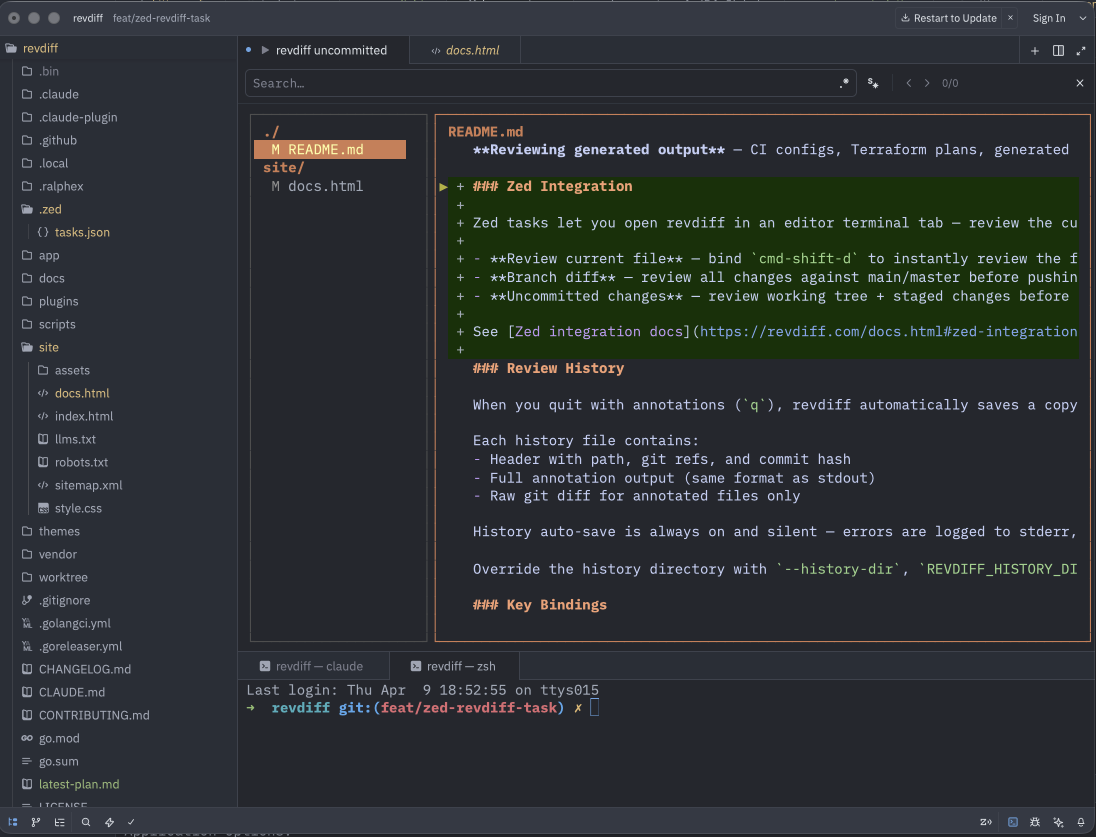
Zed's custom tasks can launch revdiff directly in an editor terminal tab. Each task writes annotations to a temp file via --output and copies them to clipboard on quit — hit cmd-v to paste straight into an assistant panel, a commit message, or a PR comment. The examples below cover the most common workflows, but you can adapt them for any review scenario.
- Review current file (
cmd-shift-d) — open the file you're editing in revdiff for line-by-line annotation - Branch diff — compare your feature branch against main/master before pushing
- Uncommitted changes — walk through working tree + staged changes before committing
Task definitions
Add these to your .zed/tasks.json (create the file if it doesn't exist). The file must contain a JSON array, so paste the whole block below; if you already have tasks, add each object to the existing tasks array.
[
  {
    "label": "revdiff current file",
    "command": "rm -f /tmp/revdiff-out.txt; revdiff --only=\"$ZED_FILE\" --output=/tmp/revdiff-out.txt; [ -f /tmp/revdiff-out.txt ] && pbcopy < /tmp/revdiff-out.txt; true",
    "use_new_terminal": true,
    "allow_concurrent_runs": false,
    "reveal": "always",
    "reveal_target": "center",
    "hide": "on_success"
  },
  {
    "label": "revdiff vs master",
    "command": "rm -f /tmp/revdiff-out.txt; MAIN=$(git symbolic-ref refs/remotes/origin/HEAD 2>/dev/null | sed 's|refs/remotes/origin/||' || echo master); revdiff \"$MAIN\" --output=/tmp/revdiff-out.txt; [ -f /tmp/revdiff-out.txt ] && pbcopy < /tmp/revdiff-out.txt; true",
    "use_new_terminal": true,
    "allow_concurrent_runs": false,
    "reveal": "always",
    "reveal_target": "center",
    "hide": "on_success"
  },
  {
    "label": "revdiff uncommitted",
    "command": "rm -f /tmp/revdiff-out.txt; revdiff --output=/tmp/revdiff-out.txt; [ -f /tmp/revdiff-out.txt ] && pbcopy < /tmp/revdiff-out.txt; true",
    "use_new_terminal": true,
    "allow_concurrent_runs": false,
    "reveal": "always",
    "reveal_target": "center",
    "hide": "on_success"
  }
]
These examples use pbcopy to copy annotations to clipboard, which is macOS-only. On Linux, replace pbcopy with xclip -selection clipboard or wl-copy (Wayland).
Keybinding
To bind cmd-shift-d to the current-file task, add this to ~/.config/zed/keymap.json:
{
  "context": "Workspace",
  "bindings": {
    "cmd-shift-d": ["task::Spawn", { "task_name": "revdiff current file" }]
  }
}
Review history
When you quit with annotations (q), revdiff automatically saves a copy of the review session to ~/.config/revdiff/history/<repo-name>/<timestamp>.md. This is a safety net — if annotations are lost (process crash, agent fails to capture stdout), the history file preserves them.
Each history file contains a header with path, git refs, and commit hash, the full annotation output (same format as stdout), and the raw git diff for annotated files only.
History auto-save is always on and silent — errors are logged to stderr, never fail the process. No history is saved on discard quit (Q) or when there are no annotations. For --stdin mode, files are saved under a stdin/ subdirectory; for --only without git, the parent directory name is used instead of a repo name.
The history file is also a crash-recovery save when the process is terminated by a signal — a SIGHUP from a dropped SSH or tmux client, or a SIGTERM. On a signal exit only the history file is written, never the -o output, because a signal is not the deliberate handoff that q and O perform. Recover the annotations the usual way — load the newest history file. A signal-delivered SIGTERM previously wrote the -o output; it no longer does.
Override the directory with --history-dir, REVDIFF_HISTORY_DIR env var, or history-dir in the config file.
In the Claude Code and Codex plugins, you can also tell the agent to use a past review by saying things like “locate my latest revdiff review” or “use the annotations from the review I just did in another terminal”. The plugin reads the newest history file for the current repo via the helper script read-latest-history.sh and processes the annotations as if they had come from a fresh launcher call. This is useful for standalone revdiff runs outside the plugin, or when the live launcher output is unavailable (e.g., a broken custom launcher or a crashed agent).
Config file
Location: ~/.config/revdiff/config (INI format). Override with --config flag or REVDIFF_CONFIG env var.
Precedence: CLI flags > env vars > config file > built-in defaults. For annotation exit status, use REVDIFF_EXIT_CODE_ON_ANNOTATIONS or exit-code-on-annotations = true.
mkdir -p ~/.config/revdiff
revdiff --dump-config > ~/.config/revdiff/config
Options
| Option | Description | Default |
|---|---|---|
--staged | Show staged changes | false |
--untracked | Show untracked files in the tree | false |
--tree-width | File tree width in units (1-10) | 2 |
--tab-width | Spaces per tab character | 4 |
--no-colors | Disable all colors | false |
--no-status-bar | Hide the status bar | false |
--wrap | Enable line wrapping | false |
--wrap-indent | Indent wrap continuation rows by N columns so they hang under the first row's content | 0 |
--page-overlap | Keep N lines from the previous screen when paging the diff | 0 |
--collapsed | Start in collapsed diff mode | false |
--compact | Start in compact diff mode (small context around changes) | false |
--compact-context | Number of context lines around changes when in compact mode | 5 |
--cross-file-hunks | Allow [ and ] to continue into adjacent files | false |
--start-at-change | Position the cursor on the first changed line | false |
--line-numbers | Show line numbers in diff gutter | false |
--word-diff | Highlight intra-line word-level changes in paired add/remove lines | false |
--filter-unreviewed | Show only files not marked reviewed | false |
--annotation-marker | Prefix shown before annotation lines | 💬 |
--exit-code-on-annotations | Exit 10 when annotations are produced | false |
--no-confirm-discard | Skip discard confirmation | false |
--no-confirm-reload | Skip reload confirmation | false |
--no-mouse | Disable mouse support (scroll wheel, click) | false |
--no-tree | Hide the file tree pane | false |
--vim-motion | Enable vim-style motion preset (counts, gg, G, H/M/L, zz/zt/zb, ZZ/ZQ) | false |
--chroma-style | Syntax highlighting theme | catppuccin-macchiato |
--theme | Load color theme from ~/.config/revdiff/themes/; use auto to choose by terminal background | |
--auto-theme-dark | Theme used by --theme auto on dark terminal backgrounds | revdiff |
--auto-theme-light | Theme used by --theme auto on light terminal backgrounds | catppuccin-latte |
--dump-theme | Print resolved colors as theme file and exit | |
--list-themes | Print available theme names and exit | |
--init-themes | Write bundled theme files to themes dir and exit | |
--init-all-themes | Write all gallery themes (bundled + community) to themes dir and exit | |
--install-theme | Install theme(s) from gallery or local file (repeatable) | |
-A, --all-files | Browse all tracked files (git and jj only) | false |
--compare-old | Compare mode: old file path (use with --compare-new; uses git diff --no-index, no VCS repo needed) | |
--compare-new | Compare mode: new file path (use with --compare-old) | |
--stdin | Review stdin as a scratch buffer | false |
--stdin-name | Synthetic file name for stdin content | scratch-buffer |
--description | Prose context shown in the info popup (markdown) | |
--description-file | Read the info-popup description from this file (markdown) | |
-I, --include | Include only files matching prefix (repeatable) | |
-X, --exclude | Exclude files by prefix (repeatable) | |
-F, --only | Show only matching files | |
-o, --output | Write annotations to file | |
--post-flush-command | Run command after a successful O flush | |
--annotations | Preload annotations from a markdown file in -o format | |
--history-dir | Directory for review history auto-saves | ~/.config/revdiff/history/ |
--keys | Path to keybindings file | ~/.config/revdiff/keybindings |
--dump-keys | Print effective keybindings and exit | |
--config | Path to config file | ~/.config/revdiff/config |
--dump-config | Print default config and exit | |
-V, --version | Show version info |
Themes
Eight bundled color themes: basic, catppuccin-latte, catppuccin-mocha, dracula, gruvbox, nord, revdiff, and solarized-dark. Stored in ~/.config/revdiff/themes/, auto-created on first run.
Press T inside revdiff to open the interactive theme selector with live preview — browse themes, see colors applied instantly, and persist your choice on confirm.
revdiff --theme dracula          # apply a theme
revdiff --theme auto             # choose by terminal background
revdiff --list-themes            # list available
revdiff --init-themes            # re-create bundled themes
revdiff --install-theme nord     # install a specific gallery theme
revdiff --init-all-themes        # install all gallery themes
revdiff --dump-theme > ~/.config/revdiff/themes/my-custom
Set default in config: theme = dracula. Or env: REVDIFF_THEME=dracula. Use theme = auto to choose by terminal background — auto-theme-dark / auto-theme-light (defaults revdiff / catppuccin-latte).
Creating custom themes
Two approaches:
- From current colors: customize individual colors via config or
--color-*flags, then dump:revdiff --dump-theme > ~/.config/revdiff/themes/my-custom - From scratch: copy a bundled theme and edit directly. Each file defines all 23 color keys plus
chroma-stylein INI format:
# name: my-custom
# description: custom color scheme
chroma-style = dracula
color-accent = #bd93f9
color-border = #6272a4
...all 23 color keys...
Community themes
Community-contributed themes live in the themes/gallery/ directory of the repository. See the theme contribution guide for format requirements and validation instructions.
Precedence
Without --theme: built-in defaults → config file → env vars → CLI flags.
When --theme is set, it takes over completely: all 23 color fields and chroma-style are overwritten, ignoring any --color-* flags or env vars. --theme + --no-colors prints a warning and applies the theme.
Color customization
All color options accept hex values (#rrggbb) and have REVDIFF_COLOR_* env vars.
| Option | Description | Default |
|---|---|---|
--color-accent | Active borders, directory names | #D5895F |
--color-border | Inactive borders | #585858 |
--color-normal | File entries, context lines | #d0d0d0 |
--color-muted | Dividers, status bar | #585858 |
--color-selected-fg | Selected file text | #ffffaf |
--color-selected-bg | Selected file background | #D5895F |
--color-annotation | Annotation text and markers | #ffd700 |
--color-cursor-fg | Cursor indicator color | #bbbb44 |
--color-cursor-bg | Cursor indicator background | terminal default |
--color-add-fg/bg | Added line text / background | #87d787 / #123800 |
--color-remove-fg/bg | Removed line text / background | #ff8787 / #4D1100 |
--color-word-add-bg | Intra-line word-diff add background | auto-derived from add-bg |
--color-word-remove-bg | Intra-line word-diff remove background | auto-derived from remove-bg |
--color-modify-fg/bg | Modified line (collapsed mode) | #f5c542 / #3D2E00 |
--color-status-fg/bg | Status bar | #202020 / #C5794F |
--color-search-fg/bg | Search matches | #1a1a1a / #4a4a00 |
--color-tree-bg | File tree background | terminal default |
--color-diff-bg | Diff pane background | terminal default |
Chroma syntax highlighting styles
Set via --chroma-style, env REVDIFF_CHROMA_STYLE, or config chroma-style = name.
Dark themes
aura-theme-dark, aura-theme-dark-soft, base16-snazzy, catppuccin-frappe, catppuccin-macchiato (default), catppuccin-mocha, doom-one, doom-one2, dracula, evergarden, fruity, github-dark, gruvbox, hrdark, monokai, modus-vivendi, native, nord, nordic, onedark, paraiso-dark, rose-pine, rose-pine-moon, rrt, solarized-dark, solarized-dark256, tokyonight-moon, tokyonight-night, tokyonight-storm, vim, vulcan, witchhazel, xcode-dark
Light themes
autumn, borland, catppuccin-latte, colorful, emacs, friendly, github, gruvbox-light, igor, lovelace, manni, modus-operandi, monokailight, murphy, paraiso-light, pastie, perldoc, pygments, rainbow_dash, rose-pine-dawn, solarized-light, tango, tokyonight-day, trac, vs, xcode
Other
RPGLE, abap, algol, algol_nu, arduino, ashen, average, bw, hr_high_contrast, onesenterprise, swapoff
Navigation
| Key | Action |
|---|---|
j/k or arrows | Navigate files (tree) / scroll diff |
h/l | Switch between tree and diff pane |
Tab | Switch between panes |
left/right | Horizontal scroll in diff (truncated lines show « / » overflow indicators at the edges) |
PgDown/PgUp | Page scroll |
Ctrl+d/Ctrl+u | Half-page scroll |
J/K | Scroll diff viewport (works from either pane) |
Home/End | Jump to first/last item |
Enter | Switch to diff (tree) / annotate (diff) |
n/p | Next/prev changed file or TOC header |
P | Open the file picker |
[ / ] | Jump to prev/next change hunk; with --cross-file-hunks, continues to prev/next file at the boundary |
e | Open focused file in $EDITOR |
The file picker lists paths currently visible in the sidebar, so annotated-only and unreviewed-only filters remain active. Printable keys always filter full relative paths; use the arrow keys or mouse wheel to move, and press Enter or left-click to jump. Backspace edits the filter. The first Esc clears a non-empty filter and keeps the picker open; the second closes it. Because printable keys always filter, P typed inside the picker adds to the filter rather than closing it; a jump_file binding with a modifier (e.g. map alt+f jump_file) closes the picker when pressed again.
Search
| Key | Action |
|---|---|
/ | Start search in diff pane |
n | Next search match (when search active) |
N | Previous search match |
↑ / Ctrl+P | Recall previous search query (in search prompt) |
↓ / Ctrl+N | Recall next search query / clear (in search prompt) |
Esc | Cancel search / clear results |
Annotations
| Key | Action |
|---|---|
a or Enter | Annotate current line |
A | Add file-level annotation |
@ | Toggle annotation list popup |
} / { | Jump to next/previous annotation (always crosses file boundaries; silent no-op at the first/last annotation) |
d | Delete annotation under cursor |
O | Export annotations without exiting (requires --output and/or --post-flush-command) |
Ctrl+E | Open $EDITOR for multi-line annotation (open_editor — rebindable, during annotation input) |
Esc | Cancel annotation input |
While the annotation input is active, press Ctrl+E (or whatever key is bound to open_editor) to hand off the current text to an external editor for multi-line comments. Editor resolution: $EDITOR → $VISUAL → vi. Values with arguments work (e.g. EDITOR="code --wait"). On editor save and quit, the full file contents (including newlines) become the annotation. Quitting the editor with an empty file cancels the annotation and preserves any previously stored note on that line. Multi-line annotations are rendered line-by-line in the diff view, shown flattened in the annotation list popup (@), and emitted with embedded newlines in the structured output.
Press e in the diff pane to open the focused file in $EDITOR (open_file_in_editor — rebindable) when revdiff has a stable source path. Editor resolution is the same $EDITOR → $VISUAL → vi chain. Known editors receive either $EDITOR +N path or $EDITOR --goto path:N as appropriate; unknown editors receive only the file path. File lines are resolved on a best-effort basis. For working tree changes, a clean editor exit reloads the displayed file. For --staged or refs, a clean editor exit returns to revdiff without reloading the displayed diff. In compare mode, e opens the --compare-new side. Working tree files with line annotations cannot be opened for editing because edits can orphan those annotations. Diffs read with --stdin do not support opening files. Unsupported rows or files and editor errors show a status hint instead of launching an editor or changing the diff.
Press O to export the current annotations without exiting (flush_output, rebindable). Configure --output, --post-flush-command, or both. With --output, each flush atomically overwrites the file with the full current annotation set (a snapshot, not an append log). With --post-flush-command, the same snapshot is sent to the command on stdin. If neither is configured, or if there are no annotations, revdiff shows a status hint and does nothing.
The output file supports a keep-open review loop with an AI agent: annotate, flush with O, let the agent read the file and edit code, then reload with R and continue in the same session.
For a local clipboard-only workflow on macOS, set post-flush-command = pbcopy in ~/.config/revdiff/config. Each O copies the full current annotation set without requiring --output. On Linux, use xclip -selection clipboard for X11 or wl-copy for Wayland.
For a terminal clipboard over SSH or a multiplexer, use OSC 52. revdiff does not include an OSC 52 helper; create an osc-copy shell script on your PATH that reads stdin and writes the clipboard sequence to /dev/tty:
#!/bin/sh
data=$(base64 | tr -d '\n')
printf '\033]52;c;%s\007' "$data" > /dev/tty
After making the script executable, run revdiff with --post-flush-command=osc-copy or set post-flush-command = osc-copy in the config file. No output file is required; add --output only when the same flush should also write a snapshot file.
The post-flush command runs synchronously. Use a fast, non-interactive command because revdiff waits for it to finish before restoring the TUI.
Press Space to mark the focused file reviewed. On R reload, revdiff keeps the mark only when the file's effective text diff is unchanged; rebases that only shift line numbers or surrounding context keep it, while changed or removed files lose it. Binary files and opaque placeholders are conservatively unmarked on reload because their rendered diff does not expose enough content to prove they are unchanged.
View toggles
| Key | Action |
|---|---|
v | Toggle collapsed diff mode |
C | Toggle compact diff view (small context around changes) |
w | Toggle word wrap |
t | Toggle tree/TOC pane visibility |
L | Toggle line numbers |
B | Toggle blame gutter (author + commit age) |
W | Toggle intra-line word-diff highlighting |
. | Expand/collapse hunk (collapsed mode) |
T | Theme selector with live preview |
f | Filter: all files / annotated only |
? | Help overlay |
i | Info popup — review scope (mode, VCS, ref, filters, file/status counts, aggregate +/- stats) plus the commit log for the current ref range when applicable |
R | Reload diff from VCS (warns if annotations exist) |
q | Quit, output annotations |
Q | Discard annotations and quit |
Status bar icons
The status bar shows a fixed row of mode indicators on the right side. All slots are always rendered — active modes use the status bar foreground color, inactive modes use muted gray, so the row occupies the same width regardless of what's toggled on. The help overlay (?) shows each icon beside the key that controls it.
| Icon | Toggle | Meaning |
|---|---|---|
▼ | v | Collapsed diff mode |
⊂ | C | Compact diff mode (small context around changes) |
◉ | f | Filter: annotated files only |
↩ | w | Word wrap mode |
≋ | / | Search active |
⊟ | t | Tree/TOC pane hidden (diff uses full width) |
# | L | Line numbers visible in gutter |
b | B | Blame gutter visible |
± | W | Intra-line word-diff highlighting |
✓ | Space | Reviewed count (revalidated on reload) |
∅ | u | Untracked files visible in tree |
On narrow terminals, the left-hand segments are dropped before the icons: search position first, then line and hunk info, then the filename truncates. The icon row on the right stays put.
Mouse support
revdiff enables mouse tracking by default so the scroll wheel and left-click work consistently across terminals.
- Scroll wheel — scrolls whichever pane the cursor is over. In the tree/TOC pane the wheel moves the cursor one entry per notch (matches
j/k). In the diff pane the wheel scrolls the viewport by three lines per notch — the diff cursor stays on its current logical line and is pinned to the visible edge if scrolling pushes it off-screen. - Shift+scroll — half-page scroll in the diff pane. In the tree/TOC pane Shift+wheel behaves the same as plain wheel (one entry per notch — no page step).
- Left-click in the tree — focuses the tree and selects/loads the clicked entry (same as pressing
j/kto land there). Clicking a directory row moves the cursor but does not load a file. - Left-click in the diff — focuses the diff and moves the cursor to the clicked line. Enables a “click, then
a” annotation flow. - Left-click in the TOC pane (single-file markdown) — focuses the TOC and selects the clicked header.
- Scroll wheel in overlay popups (info, annotations, themes, help) — scrolls the popup content or moves its cursor. Shift+wheel uses a half-page step. In the theme selector, wheel previews each theme live.
- Left-click in the annotation popup — jumps to the clicked annotation (same as pressing
Enter). - Left-click in the theme popup — confirms the clicked theme (same as pressing
Enter). Clicks on the filter row or blank separator are ignored. - Left-click in the file picker — jumps to the clicked file (same as pressing
Enter). Clicks on the filter row or blank separator are ignored. - Scroll wheel in the file picker — moves the picker cursor. Shift+wheel uses a half-page step.
Horizontal wheel, right-click, middle-click, drag selection, and clicks on the status bar or diff header are intentionally ignored. Clicks outside an open overlay are swallowed — dismiss an overlay with Esc or its toggle key. Modal states (annotation input, search input, confirm discard, reload confirm) swallow mouse events entirely.
Text selection trade-off — once mouse tracking is on, plain drag is captured by revdiff. For terminal-native text selection:
- kitty: hold
Ctrl+Shiftwhile dragging - iTerm2: hold
Optionwhile dragging - ghostty (and ghostty-based terminals such as agterm): hold
Shiftwhile dragging. Ghostty also usesShiftto extend an existing selection, so if text is already selected the drag grows that selection instead of starting a new one — clear it first. Ghostty 1.3.0+ additionally has atoggle_mouse_reportingkeybind, unbound by default, which suspends mouse capture without restarting revdiff - most other terminals: hold
Shiftwhile dragging
Because the tree pane is rendered alongside the diff on the same rows, multi-line Shift+drag will include tree content. For clean copies of diff text, use your terminal's block-select mode (Option+drag in iTerm2, Ctrl+Shift+drag in kitty) or run with --no-mouse to disable mouse capture entirely.
Opt out with --no-mouse, REVDIFF_NO_MOUSE=true, or no-mouse = true in the config file.
Custom keybindings
All keybindings can be customized via ~/.config/revdiff/keybindings. Override path with --keys or REVDIFF_KEYS.
# ~/.config/revdiff/keybindings
map ctrl+d half_page_down
map ctrl+u half_page_up
map x quit
unmap q
Generate a template: revdiff --dump-keys > ~/.config/revdiff/keybindings
Fixed modal keys (Enter, Esc in annotation/search input, confirm discard) are not remappable. Keymap-resolved actions like open_editor work during annotation input and can be rebound.
Paging the diff from the file tree
J/K scroll the diff viewport from either pane, but only by a few lines, while PgDown/PgUp and Ctrl+d/Ctrl+u stay pane-relative and page whichever pane has focus. The scroll_diff_page_* and scroll_diff_half_page_* actions are the page-sized versions of J/K — they ship with no default key, so bind them to get lazygit-style paging that always targets the diff:
map pgdown scroll_diff_page_down
map pgup scroll_diff_page_up
map ctrl+d scroll_diff_half_page_down
map ctrl+u scroll_diff_half_page_up
Three consequences worth knowing. This also replaces cursor paging while the diff pane has focus: the keys scroll the viewport and pin the cursor back into view instead of walking the cursor a page at a time. The file tree and markdown TOC lose their own page-sized traversal on those keys. And because page_down, page_up, half_page_down and half_page_up have no other default key, rebinding all four lines leaves them unbound everywhere, including the ? help and i info overlays, which page through the same actions. Omit one pair of mapping lines to keep its default paging. Because they have no default binding, these actions appear in neither the ? help overlay nor --dump-keys until you bind them.
Chord bindings (ctrl/alt leader)
Bind a two-stage chord by joining the leader and second key with >. The leader must be a ctrl+* or alt+* combo; the second stage is any single key. Only two stages are supported.
map ctrl+w>x mark_reviewed
map alt+t>n theme_select
When the leader is pressed, the status bar shows Pending: ctrl+w, esc to cancel; press the second key to dispatch, or esc to cancel silently. Binding a key as both a standalone action and a chord prefix drops the standalone binding (the chord wins, with a warning). Chord bindings work under non-Latin keyboard layouts — the second-stage key is translated via the same layout-resolve fallback as single-key bindings. Note: chord bindings do not fire during text input (annotation and search prompts) — use single-key ctrl+* bindings for actions like open_editor that need to work during annotation input.
macOS note: alt+* leaders require your terminal to send Option as Meta/Alt. Most terminals default to "Option composes special characters" (e.g. Option+T → †), in which case Alt chords silently won't fire. To enable: iTerm2 → Profiles → Keys → Left/Right Option key → Esc+; Terminal.app → Profiles → Keyboard → Use Option as Meta key; Kitty → macos_option_as_alt yes; Ghostty → macos-option-as-alt = true. If you'd rather not touch terminal settings, use ctrl+* leaders — those work everywhere with no configuration.
Available actions
Navigation: down, up, page_down, page_up, half_page_down, half_page_up, home, end, scroll_left, scroll_right, scroll_center, scroll_top, scroll_bottom, scroll_diff_down, scroll_diff_up, scroll_diff_page_down, scroll_diff_page_up, scroll_diff_half_page_down, scroll_diff_half_page_up
File/Hunk: next_item, prev_item, jump_file, next_hunk, prev_hunk, open_file_in_editor
Pane: toggle_pane, focus_tree, focus_diff
Search: search
Annotations: confirm, annotate_file, delete_annotation, annot_list, open_editor, next_annotation, prev_annotation, flush_output
View: toggle_collapsed, toggle_compact, toggle_wrap, toggle_tree, toggle_line_numbers, toggle_blame, toggle_word_diff, toggle_hunk, toggle_untracked, mark_reviewed, filter_unreviewed, theme_select, filter, info, reload
Quit: quit, discard_quit, help, dismiss
Vim-motion preset
Opt-in vim-style motion layer activated via --vim-motion, REVDIFF_VIM_MOTION=true, or vim-motion = true in the config file. Off by default — when off, existing single-key bindings are unchanged.
| Keys | Action |
|---|---|
<N>j / <N>k | Move cursor N lines down/up (diff pane, 1-9999) |
gg | Jump to first line (diff pane) |
G | Jump to last line (diff pane) |
<N>G | Goto line N (diff pane) |
H / <N>H | Cursor to top of screen / Nth line from top (diff pane) |
M | Cursor to middle of screen (diff pane) |
L / <N>L | Cursor to bottom of screen / Nth line from bottom (diff pane) |
zz | Center viewport on cursor (diff pane) |
zt | Align viewport top on cursor (diff pane) |
zb | Align viewport bottom on cursor (diff pane) |
ZZ | Quit (any pane) |
ZQ | Discard annotations and quit (any pane) |
When the preset is on, the digits 0-9 and the leader keys g, z, Z are intercepted before the regular keymap, so any standalone binding on those keys is overridden while the flag is active. <N>j/<N>k/<N>G, gg/zz/zt/zb, and the screen-position motions H/M/L apply to the diff pane only — in the file tree they fall through to the normal bindings. ZZ and ZQ work from any pane. While the preset is active L is a screen-position motion rather than the line-numbers toggle (toggle_line_numbers); remap it in the keybindings file if you need both. Press Esc to silently cancel a pending leader; an unknown second key surfaces a transient Unknown: <chord> hint in the status bar. A bare digit 0 is not consumed (falls through to whatever binding is mapped); counts over 9999 are clamped. Modal keys (search input, annotation input, overlay navigation) always take precedence over the interceptor, and ctrl+*/alt+* chord bindings keep working orthogonally.
The help overlay (?) shows a dedicated Vim motion section listing all eleven preset bindings when --vim-motion is on; when off, the section is hidden.
Claude Code plugin
revdiff ships with a Claude Code plugin for interactive code review directly from a Claude session. The plugin launches revdiff as a terminal overlay, captures annotations, and feeds them back to Claude for processing.
# add marketplace and install
/plugin marketplace add umputun/revdiff
/plugin install revdiff@revdiff
Terminal support
The plugin requires one of the following terminals since Claude Code itself cannot display interactive TUI applications. The overlay runs revdiff in a separate terminal layer on top of the current session.
| Terminal | Overlay method | Detection |
|---|---|---|
| agterm | agtermctl session overlay open … --block (full-pane overlay, blocks until quit) | $AGTERM_SESSION_ID |
| tmux | display-popup (blocks until quit) | $TMUX |
| zellij | zellij run --floating | $ZELLIJ env var |
| herdr | herdr tab create + herdr pane run (new tab), or a zoomed herdr pane split with REVDIFF_HERDR_PANE=1 | $HERDR_ENV |
| kitty | kitty @ launch --type=overlay | $KITTY_LISTEN_ON |
| wezterm | wezterm cli split-pane | $WEZTERM_PANE |
| kaku | kaku cli split-pane (same API as wezterm) | $WEZTERM_PANE |
| cmux | cmux new-split + cmux send | $CMUX_SURFACE_ID, __CFBundleIdentifier=com.cmuxterm.app, or GHOSTTY_RESOURCES_DIR / GHOSTTY_BIN_DIR containing cmux.app |
| ghostty | AppleScript split + zoom (macOS only) | $TERM_PROGRAM + AppleScript probe |
| iTerm2 | AppleScript split pane (macOS only) | $ITERM_SESSION_ID |
| Emacs vterm | New frame via emacsclient | $INSIDE_EMACS |
Priority: agterm → tmux → zellij → herdr → kitty → wezterm/kaku → cmux → ghostty → iTerm2 → Emacs vterm (first detected wins). cmux is checked before ghostty when $CMUX_SURFACE_ID is set, __CFBundleIdentifier=com.cmuxterm.app, or GHOSTTY_RESOURCES_DIR / GHOSTTY_BIN_DIR contains cmux.app. iTerm2 uses a split pane rather than a full-screen overlay.
Sandbox note: Ghostty and iTerm2 launchers use osascript (Apple Events), which is blocked by Claude Code's sandbox. If you use these terminals with sandbox enabled, add the launcher to excludedCommands in your Claude Code settings.json:
{ "permissions": { "excludedCommands": ["*/launch-revdiff.sh*"] } }Terminals that use CLI tools instead of AppleScript (agterm, tmux, Zellij, herdr, kitty, wezterm, Kaku, cmux) are not affected.
Disconnect-resilient tmux window mode: set REVDIFF_TMUX_WINDOW=1 in the launcher's environment to open revdiff in a persistent, server-owned tmux window instead of a client-owned display-popup. A dropped SSH or tmux client tears down a popup and kills the review, but a server-owned window survives the disconnect — reattach and the live review is still there. This is a launcher environment variable, not a revdiff flag.
Pane-scoped overlay (herdr): set REVDIFF_HERDR_PANE=1 in the launcher's environment to open revdiff in a zoomed split of the agent's own herdr pane instead of a new fullscreen tab, so the agent pane stays one keypress away. It needs a herdr whose CLI carries pane split, pane get and pane close; an unsupported CLI or a refused split falls back to the tab overlay; a split that succeeds but returns no usable pane id fails closed with a warning rather than opening a second surface, and may leave a stray pane to close by hand. This is a launcher environment variable, not a revdiff flag.
Pane-scoped overlay (agterm): set REVDIFF_AGTERM_PANE=1 in the launcher's environment to open revdiff in the agent's own split pane instead of over the whole session, leaving the sibling pane live and visible. It applies only when that session is split — the session-wide overlay stands otherwise, and the launcher retries session-wide if agterm refuses the pane. The review gets pane width rather than session width, which is why it is opt-in. This is a launcher environment variable, not a revdiff flag.
Plugin usage
Slash commands
/revdiff                  -- smart detection: uncommitted, last commit, or branch diff
/revdiff HEAD~1 HEAD      -- review last commit
/revdiff main             -- review current branch against main
/revdiff HEAD~3 HEAD      -- review last 3 commits
/revdiff --staged         -- review staged changes only
/revdiff all files        -- browse all tracked files
Natural language
"review diff"                       -- same as /revdiff, smart detection
"review diff HEAD~1 HEAD"           -- last commit
"review diff against main"          -- branch diff
"review changes from last 2 days"   -- Claude resolves the ref
"revdiff for staged changes"        -- staged only
"review all files exclude vendor"   -- browse project, skip vendor/
"what themes does revdiff support?" -- ask about config without launching
"switch revdiff to dracula theme"   -- modify config via conversation
The plugin includes built-in reference documentation and can answer questions about revdiff usage, themes, keybindings, and configuration. It can also create or modify the local config file on request.
The plugin supports the full review loop: annotate → plan → fix → re-review until no more annotations remain. The bundled launcher treats exit code 10 as success-with-annotations and processes stdout normally.
Ask instead of instruct: an annotation containing ?? anywhere in its text is treated as a question rather than a directive, so the agent explains that code instead of changing it. Openers explain, remind, describe, what is, what are, how does, how do and clarify do the same. ?? is the language-neutral form and works whatever you write in.
## renderer.go:142 (+)
why a pointer here??

## store.go:88 (-)
explain what this lock protects
The answer comes back as a markdown document reopened in revdiff, with a TOC sidebar, so you can annotate the explanation itself to ask follow-ups. That loop repeats until you quit without annotating. Any code-change annotations from the same batch are held and applied afterwards. The Codex plugin behaves the same way; the Pi package classifies questions too but answers them in chat.
Auto-detection
When no ref is provided, the plugin detects what to review automatically:
- On main/master with uncommitted changes — reviews uncommitted changes
- On main/master with clean tree — reviews the last commit
- On a feature branch with clean tree — reviews branch diff against main
- On a feature branch with uncommitted changes — asks whether to review uncommitted only or the full branch diff
Plan review plugin
A separate revdiff-planning plugin automatically opens revdiff when Claude or Codex completes a plan, letting you annotate it before implementation. If you add annotations, the agent revises the full plan and presents it again, looping until you're satisfied. Exit code 10 means annotations were captured, not launcher failure.
Claude Code:
/plugin marketplace add umputun/revdiff
/plugin install revdiff-planning@revdiff
Codex:
codex plugin marketplace add umputun/revdiff
codex plugin add revdiff-planning@revdiff
Start a new Codex session and trust the hook through /hooks. Automatic review only fires for complete <proposed_plan> blocks in Plan mode; /revdiff-plan remains the manual fallback.
This plugin is independent from the main revdiff plugin. In Claude Code it hooks ExitPlanMode, and so does planning from cc-thingz; Claude Code runs both hooks, so enabling both can review the same plan twice.
Custom launchers
Both Claude plugins resolve their launcher script through a two-layer chain (user → bundled, first executable wins). Drop a custom launcher into the user layer to customize how revdiff opens (separate window, alternate split layout, custom terminal multiplexer) without forking the plugin.
| Plugin | User layer | Bundled default |
|---|---|---|
diff-review (revdiff) | ${CLAUDE_PLUGIN_DATA}/scripts/launch-revdiff.sh | ${CLAUDE_SKILL_DIR}/scripts/launch-revdiff.sh |
plan-review (revdiff-planning) | ${CLAUDE_PLUGIN_DATA}/scripts/launch-plan-review.sh (Claude) or ${PLUGIN_DATA}/scripts/launch-plan-review.sh (Codex) | ${CLAUDE_PLUGIN_ROOT}/scripts/launch-plan-review.sh (Claude) or ${PLUGIN_ROOT}/scripts/launch-plan-review.sh (Codex) |
There is no project-level executable override by design: the planning hook auto-fires in repositories opened by Claude or Codex, and a repo-controlled launcher would run on routine agent actions. The override file must be executable (chmod +x). Claude uses ${CLAUDE_PLUGIN_DATA}; the Codex planning hook uses ${PLUGIN_DATA}. The Pi extension and manual Codex diff-review skill do not honor this plugin-data override. See install.md and revdiff-planning README for working examples.
Codex plugin
revdiff ships with a Codex CLI plugin for interactive diff review and plan annotation directly from a Codex session.
Add the marketplace and install the diff-review skills and automatic Plan-mode review:
codex plugin marketplace add umputun/revdiff
codex plugin add revdiff@revdiff
codex plugin add revdiff-planning@revdiff
If you previously copied the skills manually, remove ~/.codex/skills/revdiff and ~/.codex/skills/revdiff-plan after installing the plugin so the plugin copy is the only one in use.
Start a new session and trust the hook through /hooks. The hook runs only in Plan mode and first checks that session's last_assistant_message. Whenever no complete <proposed_plan> is present, it reads the exact event transcript and selects the last assistant message for the matching session and turn without requiring a provider-specific phase. Clarifications are ignored; missing or mismatched event data, dependencies, and launcher failures warn and fail open.
Annotated revisions include a guarded snapshot marker on the first line inside <proposed_plan>, so later rounds open a rolling compare. Reviewed snapshots are replaced and a clean review removes the final snapshot.
The revdiff plugin installs both interactive skills. The separate revdiff-planning plugin adds automatic Plan-mode review.
Requirements: revdiff binary on PATH, jq (only for manual /revdiff-plan), and a supported terminal multiplexer.
Skills
The plugin provides two skills:
/revdiff— same diff review workflow as the Claude Code plugin (detect ref, launch overlay, capture annotations, feedback loop)/revdiff-plan— extracts the last Codex assistant message from session rollout files, opens it in revdiff for annotation, and feeds feedback back
Codex treats exit code 10 as success-with-annotations and keeps captured output.
/revdiff              # auto-detect ref
/revdiff HEAD~3 HEAD  # review last 3 commits
/revdiff-plan         # review last Codex response
Differences from Claude Code plugin
- Automatic Plan-mode review uses the opt-in
revdiff-planningplugin;/revdiff-planremains the manual fallback - The automatic hook falls back whenever
last_assistant_messagelacks a complete plan, then selects the last assistant message for the exact transcript, session, and turn; manual/revdiff-planuses best-effort rollout discovery - Scripts are portable copies from the Claude Code plugin, not symlinks
OpenCode integration
revdiff integrates with OpenCode via a tool, slash command, and plan-review plugin. The tool wraps the existing launch-revdiff.sh launcher, so terminal detection stays in sync automatically.
# from the revdiff repo
cd plugins/opencode && bash setup.sh
The setup script copies files to ~/.config/opencode/ (commands, tools, plugins) and registers the plan-review plugin in opencode.json. The tool and plan-review plugin treat exit code 10 as success-with-annotations and keep captured output. Restart OpenCode after installing. See plugins/opencode/README.md for manual installation.
Usage
The integration provides two components:
/revdiffslash command — launches the diff review TUI with optional ref argument- Plan-review plugin — automatically launches revdiff when the assistant exits plan mode, injecting annotations back as user messages
/revdiff              # auto-detect ref
/revdiff HEAD~3 HEAD  # review last 3 commits
/revdiff --staged     # review staged changes
Output format
On quit, revdiff outputs annotations to stdout (or file via --output):
## handler.go (file-level)
consider splitting this file into smaller modules

## handler.go:43 (+)
use errors.Is() instead of direct comparison

## handler.go:43-67 (+)
refactor this hunk to reduce nesting

## store.go:18 (-)
don't remove this validation
Each annotation block: ## filename:line[-end] (type) where type is (+) added, (-) removed, or (file-level); -end is included when the annotation covers a line range.
When annotation text contains the keyword “hunk” (case-insensitive, whole word), the output header automatically expands to include the full hunk line range (e.g., handler.go:43-67 (+) instead of handler.go:43 (+)). This gives AI consumers the range context without any extra steps.
Comment body lines starting with ## (the record-header form) are prefixed with a single space on output so parsers that split on ## record headers cannot confuse a multi-line comment for a new record.
Integration with other tools
The structured stdout output works with any tool that can read text. By default revdiff exits 0 even when annotations are produced; pass --exit-code-on-annotations to return 10 for successful annotation output.
# capture annotations for processing
rc=0
annotations=$(revdiff --exit-code-on-annotations main) || rc=$?
case "$rc" in
  0) [ -n "$annotations" ] && echo "$annotations" | your-tool ;;
  10) echo "$annotations" | your-tool ;;
  *) exit "$rc" ;;
esac
Exit status: 0 = no annotations, discarded annotations, or default mode; 10 = annotations were produced with --exit-code-on-annotations; 1 = real errors.